Tide Clock
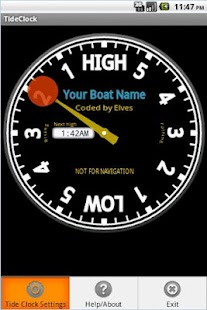
Tide Clock is just that - a clock that keeps track of high and low tides.
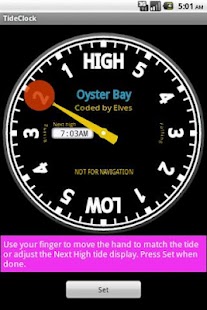
Tide Clock is easy to set - as of version 1.2.0 set the tide with your finger.
Version 1.3.6 adds the soft menu button.Version 1.37 corrects Lollipop canvas bug.
This app is without ads.
You can now set the tide with a touch of your finger.
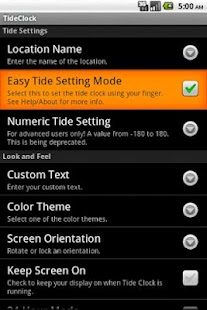
Just enable Easy Tide Setting Mode in Settings, and then simply move the tide hand to the location of the tide.
Depending on your location, Tide Clock can run accurately for a good long time without needing adjustment.
Tide Clock is not for navigation purposes, but can be used to keep track of the tide for water and beach related activities.
It is your responsibility to set and check your tide setting.
Tide Clock includes setting options, color themes, and a place for the name of your boat, beach, or club.
It does not use excessive battery, and does not require GPS or data downloads.
It has been tested to work on tablets and phones alike.
If you would like a branded version of Tide Clock for your company, boat or crew - with theme or logo, please feel free to email me.
Thank you for supporting Tide Clock.
About Tide Clock
- Package name (App ID)
- com.blogspot.sports4nerds.tideclock
- Available on
- Google Play
- Price
- Free
- Version
- v1.3.7
Looking for the Tide Clock APK?
The safest way to get Tide Clock (com.blogspot.sports4nerds.tideclock) on your Android device is to install it directly from Google Play — you'll always get the latest official version, automatic updates, and no risk of modified or infected APK files from third-party sites.
Weather Features
Get accurate weather forecasts and real-time updates.
Fitness Tracking
Track your workouts and monitor your health metrics.
Travel Features
Plan and manage your travels with ease.
See Tide Clock in Action
Frequently Asked Questions
Is Tide Clock free?
Yes, Tide Clock is free to download and install on Android through Google Play.
How do I install Tide Clock on Android?
Open Google Play on your Android phone or tablet, search for Tide Clock or tap the Google Play button on this page, then tap Install. The app downloads and installs automatically.
What is com.blogspot.sports4nerds.tideclock?
com.blogspot.sports4nerds.tideclock is the App ID (package name) of Tide Clock on Google Play. Every Android app has a unique package name, and it is the safest way to verify you are installing the official app.
Is Tide Clock safe to download?
Installing Tide Clock from Google Play is the safest option: you get the official version, verified by Google Play Protect, with automatic updates. Avoid APK files from unofficial third-party sites.
Get Tide Clock Today
Tide Clock for Android — free download on Google Play.
Compatible with Android phones and tablets — available on Google Play.
Ask AI about this app
Get instant answers about features, tips and more from popular AI assistants.